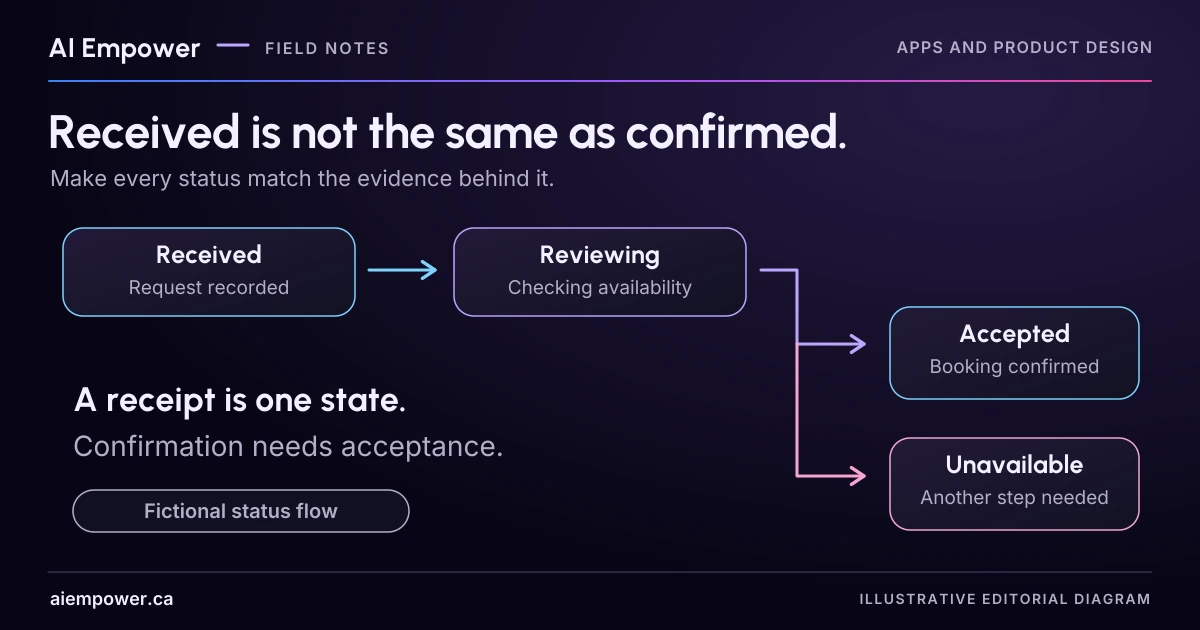
Give request receipt, acceptance, delivery and later changes distinct evidence requirements and customer-facing messages.
A visitor chooses Tuesday at two o’clock and presses “Request an appointment.” The next screen says “You’re booked.” If staff still need to review availability, the page has made a promise the business has not yet accepted.
Start with the actual state of the work. Then write the customer’s message from the evidence supporting that state. A friendly confirmation screen is useful only when its wording means the same thing to the visitor and the team.
The timeline below is a fictional appointment-request service. It performs no booking or calendar action. Use it to prepare messages and acceptance requirements for your own implementation review.
Separate receipt from acceptance
A request can be successfully stored while its proposed time remains unavailable. The system may also know that staff accepted a time while the customer notification has not yet been delivered. Those are separate facts.
For this fictional service, an appointment is confirmed only after an authorised staff decision has reserved the agreed slot and the accepted details are recorded. Your actual service may use a different acceptance mechanism. Define it explicitly before choosing the words “confirmed” or “booked.”
A receipt message could say: “We received your request for Tuesday at 2 p.m. The appointment is awaiting review. We’ll contact you through your selected contact method.” Add a response-time commitment only if the business has approved and can support it.
Build the status ladder
| State | Evidence required in this fictional design | Customer-facing wording |
|---|---|---|
| Details not submitted | Local draft only | “Your request has not been submitted.” |
| Receipt uncertain | The page has no reliable acceptance result | “We could not confirm whether your request was received.” |
| Request received | Stored request and its reference verified | “Request received. Appointment awaiting review.” |
| More detail needed | Staff recorded the missing information | “We need one more detail before reviewing your request.” |
| Appointment accepted | Authorised acceptance and reserved slot recorded | “Appointment confirmed for [verified date, time and location].” |
| Requested time unavailable | Staff recorded that decision | “The requested time is unavailable. Choose an offered alternative or contact the team.” |
The brackets in the accepted message are template fields to fill from verified records. They are not a finished message to publish with placeholders. An “accepted” state should also make the service, time zone and meeting method clear where relevant.
Try a change after acceptance
The fictional appointment is accepted for Tuesday at 2 p.m. The customer then requests Wednesday instead. Does that immediately remove Tuesday? Does Wednesday become confirmed? Neither should be guessed from the fact that a change form was submitted.
Define the business rule and expose it in the interface. In one possible design, the existing appointment remains confirmed while a change request is pending. The message would say: “Your request to move the appointment to Wednesday is awaiting review. The existing Tuesday appointment remains confirmed.” Use that wording only if it matches the actual rule.
If the business instead releases the original slot when a change is submitted, customers need to understand that consequence before submitting. A designer cannot settle it by choosing a more reassuring status colour.
Keep delivery evidence in its own field
An email being queued does not establish that a customer has read it. A booking being accepted does not establish that its notification arrived. Store and display those facts at the level your system can actually verify.
For the review exercise, add separate fields for business state, evidence reference and notification state. If notification delivery is unknown, leave it unknown. Do not reverse a valid appointment merely because an email failed, or tell a visitor to create a second request without checking the first.
This article concerns business-state meaning. Retry behaviour, duplicate prevention and delivery troubleshooting require their own implementation tests.
Rehearse the messages with a colleague
Give a colleague the six messages without the internal state labels. Ask what they believe has happened, whether they should attend, what they should do next and which details are still uncertain.
Then compare their answers with the evidence prerequisites. If “Request received” makes them think the appointment is guaranteed, strengthen the pending language and review the page title, button and calendar graphic around it. The whole screen can contradict a careful sentence.
Record one issue per state: observed misunderstanding, affected wording, proposed change and the person who owns the underlying business rule. Do not convert a few successful readings into a claim that all customers will understand.
Week 40 · interactive local candidate
Move the message only as far as the evidence
Fictional local exercise. No live AI, business verification or external action. Use invented information only. Working state stays in page memory; reset or reload clears it. Copies and printouts are outside this page’s control.
Fictional appointment request
DEMO-REQ-40: Display consultation, Tuesday 12 January 2027, 14:00, America/Toronto; Fictional studio meeting.
Change rule: The existing accepted appointment remains confirmed while a change is awaiting review.
Business-state trace
No event has occurred in this rehearsal.
Review pending. Review the current version after edits. Earlier conclusions are cleared after every edit.
Week 40: Move the message only as far as the evidence
Fictional local exercise. No live AI, business verification or external action. Use invented information only. Working state stays in page memory; reset or reload clears it. Copies and printouts are outside this page’s control.
All observations and checks below are fictional or reader-reported; none independently verified.

FIXED FICTIONAL EXERCISE CONTEXT
{
  "request": "DEMO-REQ-40",
  "version": "REQUEST-v1",
  "service": "Display consultation",
  "slot": "Tuesday 12 January 2027, 14:00, America/Toronto",
  "method": "Fictional studio meeting",
  "change": "Wednesday 13 January 2027, 14:00, America/Toronto",
  "policy": "The existing accepted appointment remains confirmed while a change is awaiting review."
}

CURRENT INPUTS AND EXPLICIT HISTORY
{
  "version": "REQUEST-v1",
  "fixture": "receipt",
  "inspected": false,
  "state": "draft",
  "notification": "unknown",
  "changed": false,
  "history": [],
  "note": "",
  "evidence": "Not yet inspected"
}

Review pending. No current conclusion; earlier review invalidated by input changes.

LIMITATIONS AND WARNINGS
• No request, booking, calendar or notification is sent. The page rehearses wording only.
• Notification failure does not undo an accepted appointment; queued is not delivered or read.
• This fictional change policy retains the original. Actual release-on-change policies need consequences explained before submission.
Use the text-only exercise
The complete unchanged manuscript remains readable if the controls are unavailable.
Return to Rehearse the messages with a colleagueVerify how changing statuses are announced
Use text as well as colour and icons. Dynamic changes also need implementation attention. W3C’s Status Messages guidance explains how relevant updates can be conveyed to assistive technology without moving focus. Test the actual flow; adding an accessibility attribute without checking the result can create missing or repeated announcements.
Your finished output is a state list, evidence requirements and message set. Have the operational owner approve the meaning, then test the interface against each transition, including unknown receipt and changed details. Only the real system’s evidence should move a request into a confirmed commitment.
Primary sources checked 4 October 2026
Sources & review
Primary sources checked on . The checklists and planning examples are AI-assisted editorial guidance, not source quotations or reported client results.
This AI-assisted guide uses fictional examples for practice. It does not report client results or establish that a live system will behave the same way.
Originally published: .