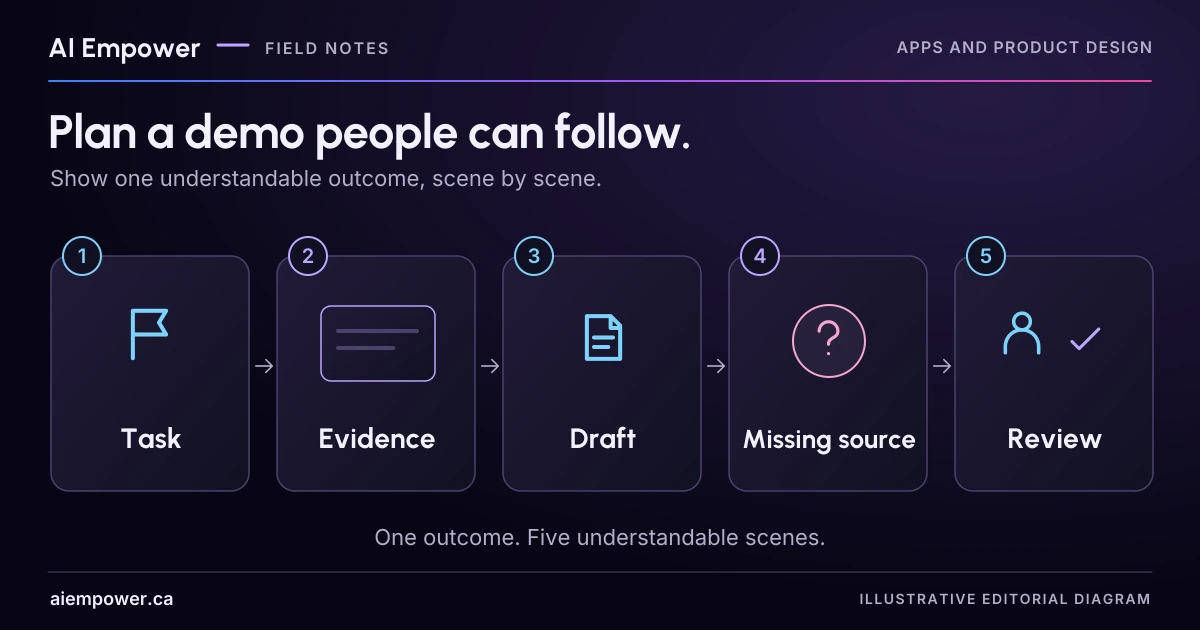
Show the task, evidence, draft boundary, missing fact and reviewed outcome in five scenes, clearly labelling simulated features.
A product demo is easier to follow when viewers can answer one question at the end: what can this person now do, and what evidence shows it happened?
Choose a single task and tell that story through a few observable scenes. Leave room for a failure or uncertainty, because that is often where a buyer learns what staff will actually need to do. Keep live capabilities, prototypes and planned work visibly distinct throughout.
This article develops a fictional storyboard. It depicts no existing AI Empower or Studio capability, client workflow or measured result. Use the five scene descriptions below for a paper storyboard. If the storyboard planner is available on this page, record each scene’s purpose, evidence, narration and implementation status, and rehearse the missing-source condition. The planner captures no screenshots or recordings and verifies no capability.
Choose the decision the viewer needs to make
Imagine a fictional office-services manager considering a staff-only enquiry drafting tool. Their immediate decision is whether the draft is understandable and reviewable enough to justify a bounded trial. They are not deciding whether to authorise automatic sending.
Write that decision above the storyboard. It protects the demonstration from becoming a tour of every menu. A settings screen belongs only if it helps answer the viewer's question. An impressive animation that hides the source or review step may make the decision harder.
Define the story's start and finish. Here, the start is an invented enquiry arriving with an approved service-information sheet. The finish is a staff-reviewed draft with a visible unresolved question. No customer message is sent.
Scene one establishes the situation
Show a fictional enquiry: “Can we arrange an on-site setup session next Thursday, and what should we prepare?” Beside it, identify the staff role and the task: prepare an accurate reply for review.
The presenter should say which parts are fictional and which environment is being shown. If this is a wireframe, label it “Storyboard concept” on the scene itself. If the enquiry is a test fixture in a working prototype, say that. Do not use an actual customer's inbox merely to make the opening feel authentic.
The viewer should now understand why the next screen exists. They do not need the product's entire origin story before seeing the task.
Scene two makes the evidence visible
Show the supplied service guide. In the fictional guide, on-site setup can be discussed after staff confirm scope and location. The initial enquiry needs the task, existing tools and desired outcome. There is no current availability record for next Thursday.
Highlight the passage used for each fact with normal, readable text. Keep the source long enough for the viewer to understand the condition. A tiny screenshot with an animated glowing box proves little if nobody can read what the box contains.
Add a presenter note: “This guide supports discussing the service; it does not confirm a date.” That line sets up the review task without inventing a product feature.
Scene three shows the proposed draft and its boundary
The fictional draft reads: “Please describe the task, tools and outcome you have in mind so the team can review whether an on-site setup session fits. Next Thursday has not been confirmed.”
Next to it, show the source reference and the unresolved date question. If those side-by-side controls are only designed, label the entire scene as a prototype concept. Do not splice a static source panel into a live screen and present the combination as an implemented feature.
Keep the actions honest too. A button labelled “Approve draft” should not be described as sending an email. If the demonstration only saves local state, explain that limit. The viewer needs to know which effect the action actually has.
Scene four introduces a missing fact
Remove the service guide or replace it with a fixture containing no on-site information. Ask the same question. In the proposed story, drafting should stop or identify that the answer cannot be supported, leaving the request with staff.
This is the scene most likely to expose a gap. If the current prototype invents the answer, show the failed result honestly and identify it as work required before the trial. Do not replace the failure with a polished animation and call the result a successful test.
If no executable prototype exists, use a labelled expected-state panel: “Proposed response when the source is missing.” That still helps discuss the requirement. It simply supports a different conclusion from a demonstrated working behaviour.
Scene five closes on a reviewable outcome
Return to the original source and show the final state the demonstration can actually establish: a reviewed example draft, a missing-date note and an owner for the next check. Summarise the decision: is there enough evidence to plan another test, or is a prerequisite missing?
Do not end with an invented savings figure. Ask the viewer to explain what happened, what did not happen and what they would need to see next. Their answers can reveal whether the demo communicated the boundary.
GOV.UK's alpha guidance describes using prototypes to test risky assumptions with only the complexity needed for that learning. That is a useful design reference, not a delivery timetable or rule for this business. This storyboard tests whether a reviewer can follow the evidence and unresolved work.
Keep a claim ledger beside the scenes
For every scene, write its purpose, visible evidence, presenter words and implementation status. Use plain status labels:
- Working behaviour observed in this named environment.
- Simulated data or response.
- Clickable design with no connected action.
- Proposed feature not implemented.
- Failed test requiring rework.
If the evidence changes, update the narration and captions. Identify edits that skip waiting, change versions or join separate takes. Edited footage can communicate clearly, but it should not suggest an uninterrupted live workflow when that is not what happened.
Provide captions for spoken information and an accessible transcript or written walkthrough. Keep important facts in readable page text rather than only in a video frame. Review any screenshots for private data and permissions before sharing.
Rehearse with someone who did not build it
Give the viewer the decision question, then run the five scenes without explaining every click. Afterwards, ask them to reconstruct the task and its limits. If they believe a booking was confirmed or an email was sent, revise the sequence and wording before polishing the visuals.
The finished deliverable is a five-scene storyboard, a claim ledger and a list of screenshots or recordings still needed. Discuss a custom business demo with AI Empower, bringing the one user outcome you want people to understand.
Week 24 · interactive local candidate
Tell one five-scene story
Fictional local practice v1. Nothing is sent, saved between visits, verified with a real business, approved for release or published. No network requests, analytics or persistent storage. Use invented, low-sensitivity entries only; do not enter passwords, payment details or private customer information.
Viewer decision
Is the draft understandable and reviewable enough to justify a bounded trial? Automatic sending is not authorised.
Scene 1: Establish the situation
Always visible boundary: fictional storyboard; no booking confirmed, customer email sent or savings established by this planner.
Week 24: Tell one five-scene story
Fictional local practice v1. Nothing is sent, saved between visits, verified with a real business, approved for release or published. No network requests, analytics or persistent storage. Use invented, low-sensitivity entries only; do not enter passwords, payment details or private customer information.
All observations and checks below are fictional or reader-reported; none independently verified.

Viewer decision: Is the draft understandable and reviewable enough to justify a bounded trial? Automatic sending is not authorised.
Start: fictional enquiry + approved service-information sheet.
Finish: staff-reviewed draft with a visible unresolved question; no customer message sent.
Enquiry: Can we arrange an on-site setup session next Thursday, and what should we prepare?
Original fixture reference only (not active support when source is missing):
Supplied guide: On-site setup can be discussed after staff confirm scope and location. The initial enquiry needs the task, existing tools and desired outcome. There is no current availability record for next Thursday.
Supplied draft: Please describe the task, tools and outcome you have in mind so the team can review whether an on-site setup session fits. Next Thursday has not been confirmed.
Source rehearsal: present

Scene 1: Establish the situation
Purpose: Prepare an accurate reply for review.
Visible evidence / expected-state plan: Can we arrange an on-site setup session next Thursday, and what should we prepare?
Presenter words / transcript: Storyboard concept. The enquiry and staff role are fictional.
Status: Proposed feature not implemented
Environment: [not recorded]
Reader-reported observation: [not recorded]
Screenshot/recording still needed: Capture the fictional enquiry and staff role.

Scene 2: Make the evidence visible
Purpose: Show the conditions behind each service fact.
Visible evidence / expected-state plan: On-site setup can be discussed after staff confirm scope and location. The initial enquiry needs the task, existing tools and desired outcome. There is no current availability record for next Thursday.
Presenter words / transcript: This guide supports discussing the service; it does not confirm a date.
Status: Proposed feature not implemented
Environment: [not recorded]
Reader-reported observation: [not recorded]
Screenshot/recording still needed: Capture a readable guide passage with its conditions.

Scene 3: Show the draft and boundary
Purpose: Make the draft reviewable with its unresolved question.
Visible evidence / expected-state plan: Please describe the task, tools and outcome you have in mind so the team can review whether an on-site setup session fits. Next Thursday has not been confirmed.
Presenter words / transcript: Proposed source panel and draft. No customer message is sent; next Thursday is unconfirmed.
Status: Proposed feature not implemented
Environment: [not recorded]
Reader-reported observation: [not recorded]
Screenshot/recording still needed: Capture draft, source reference and unresolved-date note together.

Scene 4: Introduce a missing fact
Purpose: Test what happens when the source has no on-site information.
Visible evidence / expected-state plan: Proposed response when the source is missing: stop drafting or identify the unsupported answer and leave the request with staff.
Presenter words / transcript: Expected-state panel only. An invented answer would be a failed test requiring rework.
Status: Proposed feature not implemented
Environment: [not recorded]
Reader-reported observation: [not recorded]
Screenshot/recording still needed: Capture the actual failure or clearly labelled expected state; never replace a failed test with an apparent success.

Scene 5: Close on a reviewable outcome
Purpose: Decide whether another bounded test has its prerequisites.
Visible evidence / expected-state plan: Reviewed example draft, missing-date note and an owner for the next check.
Presenter words / transcript: No booking confirmed, no email sent and no time-savings result established.
Status: Proposed feature not implemented
Environment: [not recorded]
Reader-reported observation: [not recorded]
Screenshot/recording still needed: Capture the draft, date question and named next-check role.

Next-check owner: [not recorded]
Viewer reconstruction (unverified notes):
happened: [not recorded]
notHappened: [not recorded]
next: [not recorded]
edits: [not recorded]
Warnings:
• Next-check owner is missing. Next Thursday remains unconfirmed.
• Narration and custom text are not semantically verified. Keep no-send, unconfirmed-date and implementation limits visible in every scene where they matter.
Before sharing: review screenshots for private data/permissions; provide captions and a readable transcript; disclose cuts, waiting skipped, version changes and joined takes. No screenshots or recordings captured by this tool.
Use the text-only exercise
The complete unchanged manuscript remains readable if the controls are unavailable.
Return to Rehearse with someone who did not build itSources & review
Primary sources checked on . The checklists and planning examples are AI-assisted editorial guidance, not source quotations or reported client results.
This AI-assisted guide uses fictional examples for practice. It does not report client results or establish that a live system will behave the same way.
Originally published: .